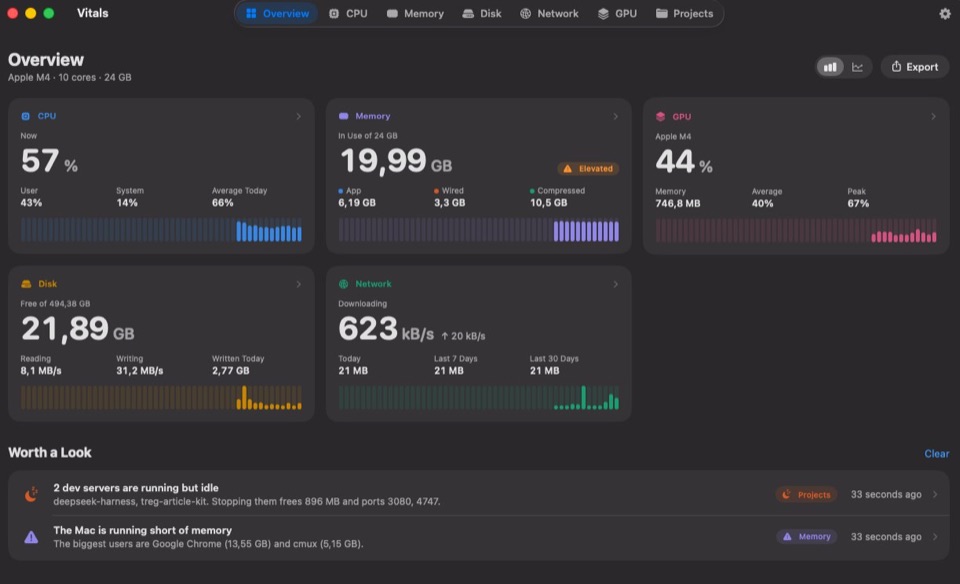
New Vitals 1.9: The Process Inspector Vitals 1.9

The  Activity Monitor
alternative for Mac

An activity monitor and process inspector with CPU, GPU, memory, temperatures, fans, disk, network and battery, the app behind every figure, up to a year of history, every coding agent you run, and an MCP server for Claude, Codex and Cursor.

Memory by Type
82%
in use
App 22.15 GB
Wired 5.67 GB
Compressed 24.54 GB
Cached 10.32 GB
Free 1.32 GB
Memory by App
59.25 GB
all apps
Google Chrome 21.23 GB
VS Code 8.17 GB
Terminal 3.86 GB
Safari 2.69 GB
Other 23.30 GB
Power by App
1.7 W
all apps
GitHub Desktop 427 mW
Google Chrome 367 mW
Zoom 145 mW
Terminal 86 mW
Other 650 mW
Now
27 %
Average today36%
Load3.41
User
19%
Your apps
System
8%
macOS
Cores
12
8 P4 E
Top App
Google Chrome
18.2%
AppCPU
Google Chrome
96 processes
–
Terminal
49 processes
–
Safari
16 processes
–
Docker
9 processes
–
Visual Studio Code
63 processes
–
Slack
13 processes
–
Figma
14 processes
–
Zoom
8 processes
–
In use of 64 GB
52.63 GB
Normal
Free11.37 GB
Swap0 MB
App
23.43 GB
Wired
5.37 GB
Compressed
23.82 GB
Top App
Google Chrome
20.59 GB
AppMemory
Google Chrome
96 processes
–
Visual Studio Code
63 processes
–
Terminal
49 processes
–
Safari
16 processes
–
Docker
9 processes
–
Slack
13 processes
–
Figma
14 processes
–
Zoom
8 processes
–
Free of 994.66 GB
479.72 GB
Used514.94 GB
Written today38.9 GB
Reading
737 kB/s
Writing
195 kB/s
Volumes
2
Macintosh HDBackup
Top App
Photos
121 kB/s
AppWriting
Photos
6 processes
–
Google Chrome
96 processes
–
Docker
9 processes
–
Visual Studio Code
63 processes
–
Xcode
22 processes
–
Mail
4 processes
–
Slack
13 processes
–
Music
5 processes
–
Downloading
12 kB/s
Today4.4 GB
Last 30 days212 GB
Uploading
419 kB/s
Last 7 Days
48.3 GB
Interface
Wi-Fi
en0
Top App
Safari
8 kB/s
AppDownloading
Safari
16 processes
–
Google Chrome
96 processes
–
Slack
13 processes
–
Zoom
8 processes
–
Music
5 processes
–
Mail
4 processes
–
Docker
9 processes
–
Notion
6 processes
–
Apple M2 Max
60 %
Average32%
Peak95%
Memory
1.69 GB
Average
32%
Peak
95%
Top App
Figma
35%
AppGPU
Figma
14 processes
–
Google Chrome
96 processes
–
Safari
16 processes
–
Zoom
8 processes
–
Visual Studio Code
63 processes
–
Xcode
22 processes
–
Slack
13 processes
–
Notion
6 processes
–
16-core Neural Engine
2 %
Average3%
Peak16%
Memory Traffic
79.9 MB/s
Average
3%
Peak
16%
Top App
Photos
3 connections
AppNeural Engine
Photos
6 processes
–
Xcode
22 processes
–
Safari
16 processes
–
Zoom
8 processes
–
Mail
4 processes
–
Notion
6 processes
–
Google Chrome
96 processes
–
On battery
64 %
Remaining2h 46m
Cycles412
Power Draw
12.6 W
Health
76%
Temperature
31°
Top App
Google Chrome
4.3 W
AppPower
Google Chrome
96 processes
–
Zoom
8 processes
–
Figma
14 processes
–
Slack
13 processes
–
Safari
16 processes
–
Visual Studio Code
63 processes
–
Docker
9 processes
–
Music
5 processes
–
Output
MacBook Pro Speakers
64%
AppStatusVolumeLevel
Music Playing 100%
Zoom Playing 80%
Google Chrome Playing 35%
Slack Silent Muted
Safari Silent 100%
Figma Silent 100%
Notion Silent 100%
Mail Silent 100%
3 connected
Lowest battery: AirPods Pro, left, 42%. Beats Fit Pro is paired but away.
42% Bluetooth Settings
DeviceKindBatteryLevel
AirPods Pro Headphones
Left 42%
Right 58%
Case 80%
Magic Trackpad Trackpad 67%
Magic Keyboard Keyboard 91%
4 dev servers are running but idle
Stopping them frees 1.37 GB and ports 3000, 4321, 4322, 8000.
Stop All…
storefront
9 processes
working
1.18 GB
storefront-web
node
4322 up 3 days, barely used
458 MB
scraper-api
python
8000 up 4 days, barely used
412 MB
marketing-site
node
4321 idle 2 hours
296 MB
billing-api
node
30009229 idle 45 min
204 MB
docs
node
5173
188 MB
ml-notebooks
python
8888
164 MB
design-tokens
node
6006 idle 20 min
121 MB
infra
3 processes
96 MB
auth-service
go
8080
74 MB
email-templates
node
3030 idle 3 hours
58 MB
0%
Claude
This week
On pace · 10% to spare
0%
Codex
5-hour session
Resets in 3h 12m
0%
GitHub Copilot
Premium requests
Runs out in 4d at this rate
0%
Cursor
This billing cycle
Resets in 12d 5h
Checkout flow tests Working Waiting for you
Claude Code · storefront · running 48 min
410 MB
Started · 4 Quit Session…
vitest command · 61% CPU 520 MB
node server · port 3,001 240 MB
Google Chrome for Testing browser 310 MB
mcp-server-fetch tool server 64 MB
Codex idle 48 min
docs · in Terminal · Nothing started
290 MB
4 containers in Docker
674MB
Lowest592.3 MB
Peak674 MB
By Container
postgres312 MB46%
rabbitmq206 MB31%
minio142 MB21%
redis14 MB2%
CPU
3.0%
most in postgres
Closest to Its Limit
rabbitmq
86% of 240 MB
Network
9kB/s
↓ 6 kB/s · ↑ 3 kB/s
Published Ports
6
5433567263799000+2
storefront 2 containers
Started together by Docker Compose · 2 ports · 2 running
1.9% 326 MB
postgres postgres:16
Up 5 hours
5433
1.6% 312 MB
redis redis:7-alpine
Up 5 hours
6379
0.3% 14 MB
api 1 container
Started together by Docker Compose · 2 ports · 1 running
0.9% 206 MB
rabbitmq rabbitmq:3-management
Up 3 hours
567215672 86% of 240 MB
0.9% 206 MB
minio minio/minio
Up 26 hours
90009001
0.2% 142 MB

Try it: every tab works. The figures are simulated, because a web page cannot read your Mac and should not.

…it doesn't feel overwhelming or bloated in the slightest. It feels native. Lightweight. It's an absolutely vital app.

Merlin ★★★★★ Verified owner

Now I find myself stealing quick glances at the menu bar, instead of taking another sip of coffee.

Ed WisemanVerified on X Emmy-winning director and producer

I’ve tried many monitoring tools in the past, and Vitals just shows me exactly the information i need to see.

Tobias Strebitzer ★★★★★ CTO · Verified owner
01Apps

Processes grouped by app

Activity Monitor lists every process. On a working Mac that is about a thousand rows, a hundred of them called Google Chrome Helper.

Vitals adds each helper to the app that launched it. Every app gets one row and one figure, so "what is using my memory?" has a one-line answer.

922 processes
Google Chrome
96 processes
21.19 GB
Google Chrome Helper (Renderer) 48211 1.92 GB
Google Chrome Helper (Renderer) 48377 1.31 GB
Google Chrome Helper (GPU) 48190 842 MB
Visual Studio Code
63 processes
8.17 GB
Code Helper (Renderer) 1904 1.12 GB
Code Helper (Plugin) 1933 968 MB
Code Helper (GPU) 1899 412 MB
Terminal
49 processes
3.81 GB
node 60412 486 MB
node 60533 391 MB
zsh 60120 12 MB
Safari
16 processes
2.69 GB
Safari Web Content 7731 612 MB
Safari Web Content 7790 388 MB
Safari Networking 7702 94 MB
Docker
9 processes
1.57 GB
Slack
13 processes
1.06 GB
Figma
14 processes
912 MB
Zoom
8 processes
640 MB
02Process Inspector

Code signature, parent and command line for every process

Activity Monitor gives a process a name and a number. Vitals tells you which app it belongs to, who built it and where it came from.

  • Code signature, Team ID, entitlements and sandbox
  • Parent process, launch agent and the full command line
  • CPU time, memory peak, open files and listening ports since it started

Copy it, save it as CSV, or get the same in Terminal with vitals process. Everything it shows.

Google Chrome Helper (Renderer)
Tab Process
Memory
1.92 GB
CPU
4.2%
Disk
12 kB/s
Identity
Process ID
48211
Parent Process
Google Chrome (48190)
Running For
6h 12m
App
Version
156.0.8078.74
Architecture
Universal · x86_64 · arm64
Arguments
--type=renderer --lang=en-US --num-raster-threads=4 --enable-zero-copy
Security
Signature
Google LLC · Team ID EQHXZ8M8AV
Hardened Runtime
Yes
Sandbox
No
Resource Usage
CPU Time
12m 40s User 10m 23s · 82%System 2m 17s · 18%
Memory
1.92 GB · 88% of its 2.18 GB peak
node
Terminal · PID 60412
Memory
486 MB
CPU
0.6%
Disk
0 kB/s
Identity
Process ID
60412
Parent Process
zsh (60120)
Launched By
Terminal (581)
Running For
2d 4h
Executable
Architecture
Apple silicon · arm64
Arguments
node_modules/.bin/next dev --port 3000
Security
Signature
Node.js Foundation · Team ID HX7739G8FX
Hardened Runtime
Yes
Sandbox
No
Resource Usage
CPU Time
1h 52m User 1h 42m · 91%System 10m 5s · 9%
Memory
486 MB · 61% of its 797 MB peak
Network
Listening Ports
3000
com.docker.backend
Docker · PID 20311
Memory
1.57 GB
CPU
2.1%
Disk
340 kB/s
Identity
Process ID
20311
Parent Process
Docker (20288)
Running For
3d 1h
App
Version
4.88.1
Architecture
Apple silicon · arm64
Security
Signature
Docker Inc · Team ID 9BNSXJN65R
Hardened Runtime
Yes
Sandbox
No
Resource Usage
CPU Time
3h 8m User 2h 0m · 64%System 1h 8m · 36%
Memory
1.57 GB · 77% of its 2.04 GB peak
WindowServer
macOS · PID 615
Memory
1.21 GB
CPU
9.8%
Disk
0 kB/s
Identity
Process ID
615
Parent Process
launchd (1)
User
_windowserver
Running For
14d 13h
App
Bundle ID
com.apple.SkyLight
Version
1.600.0
Architecture
Apple silicon · arm64e · arm64
Security
Signature
Apple
Hardened Runtime
No
Sandbox
No
Resource Usage
CPU
9.8%
Memory
1.21 GB
04Developers

Built for Macs that run coding agents

Agents start servers, browsers and tool servers, and use up your AI plans. Vitals shows all of it, by project.

Projects 8 dev servers · 6 idle
4322
storefront-web
node · up 3 days, barely used
458 MB Stop…
8000
scraper-api
python · up 4 days, barely used
412 MB Stop…
4321
marketing-site
node · idle 2 hours
296 MB Stop…
3000
billing-api
node · idle 45 min
204 MB Stop…
5173
docs
node
188 MB working
8080
admin-panel
java · up 2 days, barely used
612 MB Stop…
6006
design-system
node
242 MB working
8888
notebooks
python · idle 5 hours
336 MB Stop…
storefront-web stopped. 458 MB and port 4322 are free.
Agents 2 sessions · 1.79 GB · 66% CPU
0%
Claude
This week
On pace · 10% to spare
0%
Codex
5-hour session
Resets in 3h 12m
0%
GitHub Copilot
Premium requests
Runs out in 4d at this rate
0%
Cursor
This billing cycle
Resets in 12d 5h
Checkout flow tests Working Waiting for you
Claude Code · storefront · running 48 min
410 MB
Started · 4 Quit Session…
vitest command · 61% CPU 520 MB
node server · port 3,001 240 MB
Google Chrome for Testing browser 310 MB
mcp-server-fetch tool server 64 MB
Codex idle 48 min
docs · in Terminal · Nothing started
290 MB
Codex Connected to Vitals
Claude Connected to Vitals
Cursor Connected to Vitals
My Mac feels slow. What is going on?
Asked Vitals
Google Chrome 48% CPU for 10 min · 3.3 GB
Xcode building · 6 cores
storefront-web node · 458 MB · unused for 3 days

Xcode is your build. Shall I ask Vitals to quit the dev server?

Yes
Vitals
Codex asks to quit storefront-web
node · port 4322 · 458 MB
Vitals thinks this is safe to quit.
Don’t Quit Quit

Done. 458 MB and port 4322 are free.

My battery is at 40% and it is not even noon. Why?
Asked Vitals
Zoom 11 W on average this morning
Google Chrome 4 W on average
Xcode 2 W, one build

Zoom used the most, through your call at ten. Chrome is next, with 42 tabs open. Nothing here needs quitting.

Something is on port 3000. What is it?
Asked Vitals
billing-api node · port 3000 · 204 MB

A dev server in billing-api, started two days ago and idle for three hours. It still answers, so it is yours to keep or quit.

Leave it.

Left running.

Terminal — zsh
~ vitals status
● CPU 27% · Apple M4 Pro, 14 cores
● Memory 52.6 GB of 64 GB · pressure normal
● GPU 18%
● Disk 412 GB free of 1 TB
● Network down 1.2 MB/s · up 84 KB/s
● Battery 82% · 4h 10m left
● Heat CPU 52° · fans 1,800 rpm
~ vitals top memory 4
APP MEMORY CPU PROCS
Google Chrome 21.2 GB 48% 96
VS Code 8.2 GB 14% 31
Terminal 3.9 GB 3% 12
Figma 2.8 GB 6% 8
62 apps running · by memory
~ vitals ports
PORT PROCESS PROJECT OPEN TO
3000 node storefront-web network
4322 node docs-site this Mac
5432 postgres – this Mac
8080 python api this Mac
4 ports listening · 1 open to the network
~ vitals stop --idle
✓ Safe to quit node (48211) of docs-site · port 4322
Idle for 3 days. Stopping it frees 458 MB.
Continue? [y/N] y
Stopped node (48211). Port 4322 is free.
~ vitals agents
AGENT PROJECT STATUS MEMORY
Claude Code storefront-web working 412 MB
Codex api waiting for you 4m 287 MB
Gemini CLI docs-site working 198 MB
3 sessions · 6 processes started
~ vitals limits
TOOL LIMIT LEFT RESETS PACE
Claude 5-hour session 59% in 2h 10m on pace
Claude This week 72% Mon 9:00 on pace
Codex This week 38% Thu 14:00 runs out Wed
Cursor This month 81% Nov 3 on pace
$ brew install --cask foredotstudio/tap/vitals
05Compared

Vitals compared with Activity Monitor

Activity Monitor is good at showing what is happening this second. Vitals also tells you which app is responsible, what happened while you were not looking, and when something needs your attention.

The whole comparison, row by row: Vitals vs Activity Monitor.

Feature Activity Monitor Vitals
What the list shows
Activity Monitor Every process, about 1,000 rows
Vitals Every app, about 60 rows
Memory, CPU, energy, disk and network per app
Activity Monitor You add up the helpers yourself
Vitals One figure per app, helpers included
Process details
Activity Monitor An Inspect window: memory, open files, ports and a sample
Vitals Code signature, parent process, command line and Info.plist
History
Activity Monitor Live graphs, and 12 hours for energy
Vitals Every metric, per app, for up to a year
Alerts when an app misbehaves
Activity Monitor None
Vitals High CPU, growing memory, heavy disk or network
Menu bar
Activity Monitor None. Its Dock icon can show CPU use
Vitals Each reading as its own item, with a dropdown
Temperatures, fan speeds and fan control
Activity Monitor None
Vitals Included
GPU and Neural Engine
Activity Monitor A GPU column and a GPU History window
Vitals A tab for each, with the apps using it
Dev servers and open ports
Activity Monitor None
Vitals By project, idle ones pointed out
Docker containers
Activity Monitor Processes only
Vitals Memory, CPU, network and ports per container
Coding agents and AI plans
Activity Monitor None
Vitals Each agent, what it started, and what is left of your plans
AI assistants
Activity Monitor None
Vitals Claude, Codex and Cursor ask over MCP
Command line
Activity Monitor None. top and ps list processes
Vitals The vitals command, as a table or JSON
Volume per app and Bluetooth batteries
Activity Monitor None
Vitals Included
Price
Activity Monitor Included with macOS
Vitals $9 for a year of updates, or $15 for life, $39 after the launch. Paid once

Comparing more than Activity Monitor? See Vitals vs iStat Menus, Vitals vs Stats, or all the Activity Monitor alternatives. Coming from Windows? Read Task Manager for Mac, or browse every guide.

06Privacy

What you run stays on your Mac

An activity monitor sees every app you run and every project you work on. Vitals keeps all of it on your machine. Read the privacy details.

No account

You buy a license key. There is nothing to sign in to.

No analytics

Vitals does not report what you run, when, or for how long.

Two network requests

One checks for updates. One checks your license. That is all.

07Extras

Also included

Ten smaller features that come with Vitals.

Chrome is keeping the CPU busy
70% on average for 10 minutes.
Slack keeps using more memory
Up 1.4 GB in an hour, now 3.3 GB.

Alerts for misbehaving apps

A notification when an app hogs the CPU, keeps growing in memory, or hammers the disk or network.

Zoom
Music
Google Chrome

Volume control per app

Turn the meeting up and the music down. Nothing is recorded.

52°
CPU
2,230
Fan, rpm
82%
AirPods

Temperatures, fans and batteries

CPU and GPU temperature, fan speed you can set, and the battery in your AirPods, mouse and keyboard.

Up to a year of history

From the last hour to the last year, and which apps used the most. Keep 30 days, 90 days, 6 months or a year, in one small file on your Mac.

Quit Google Chrome?
96 processes will close.
Cancel Quit

Quit and force quit

Quit an app or a single process from any list. Vitals always asks first.

Vitals MacBook Pro · M2 Max
52.63GB
Saved to Downloads

Export as an image

Save a 1200 × 630 share card of your memory, top apps and CPU, or copy the whole dashboard. Made for posts, in light or dark.

CPU 27%
Memory 52.6GB
Network 12kB/s
GPU 60%

Arrange everything

Choose the tabs, then show, hide and reorder the sections on each. The dropdown’s tiles and the menu bar’s items too. Reset puts it all back.

Temperature 52 °C 126 °F
Network 12.5 MB/s 100 Mbps
CPU 340% of a core 34% of the Mac

Units you choose

Celsius or Fahrenheit, bytes or bits, CPU per core or per Mac. Settings shows each with your own Mac’s figures.

Vitals Monochrome Accessible

Calm, colorful or compact

Gray charts or Vitals’ colors, a set color-blind eyes can tell apart, the numbers in any font, and a compact layout for a small screen.

In your language

English and ten more languages, in the words your Mac already uses. Vitals follows the language your Mac is set to.

Wall of love

Take it from 149 Mac users

What they said in the app, and on X, Hacker News, Product Hunt and AppSumo, in their own words.

Kai’s profile

Makes up really well for everything the built-in Activity Monitor lacks on MacOS, and then some… Highly recommended and well worth the money for the peace of mind it gives me!

Kai Verified owner
Stefano’s profile

This is a great, well-designed app… It replaced many apps I’d been using with just this one.

Stefano Software engineer · Verified owner
James’s profile

This is THE modern resource management tool. For agentic coding, the built in MCP is a game changer.

James Verified owner
Federico’s profile

It’s a game changer on my mac - I probably wouldn’t be able to ever go back

Federico Verified owner

Love it - bought it as one of the first 100 users and even then i was happy with the funnctionality, but now vitals really is superb…

Hauke Verified owner
Fclmnt’s profile

Simple, easy to use… I highly recommand, the status bar widget is fully customisable and super clean.

Fclmnt iOS developer · Verified owner
Abdola Munir’s profile

Amazing tool!

Abdola Munir Verified owner
Atharv’s profile

I recently bought Vitals and I'm enjoying it.

Atharv Student · Verified owner
Yusuke’s post on X

Been using Vitals and the UX has been amazing so far! Super clean and intuitive. Really enjoying it 🙌

Yusuke Verified on X @yusukelp
Asdrúbal Chirinos’s post on X

Vitals has reminded me of two vital things: first, that Dia is using up most of my memory (something that was supposedly one of its strengths when we switched from Chrome), and second, that I need to order my next Mac with 32 GB of memory.

Asdrúbal Chirinos @achirinos
Brad Vincent’s post on X

If you on Mac running agents then use this app. Been using for just over a week and loving it. It tells me which codex projects are eating all my resources

Brad Vincent @bradvin
MattAppSumo’s review on AppSumo

I've been looking for this app for years

Disclaimer: I'm part of the AppSumo team. This in no way influences my review or rating of this product. Vitals is everything I've been looking for (and more) for my Mac. Within 5 minutes of using it, I've already reclaimed 10GB of memory capacity from old processes and containers I didn't even realize were running. If you've been struggling with speed, memory, or "why is my computer hot?", THIS IS THE APP FOR YOU!! It's simple, fast, and beautifully designed. Highly recommend.

MattAppSumo Verified purchaser
30A Nerds’s post on X

Okay. This may be one of the coolest apps I have seen on Mac in a very long time. Very well done!

30A Nerds Verified on X @30anerds
DustyFski’s post on X

After years of using iStats, I’ve uninstalled it, even with a lifetime license. Switched to Vitals on both my Mac Studio and my laptop. Much more responsive, does what I need better and supports a solo founder. Here's to lots of frequent updates and new features with the power of AI!

DustyFski Verified on X @DustyFski
Dominik Sobe’s post on X

Super cool idea man!!!

Dominik Sobe Verified on X @sobedominik
Knowix’s post on X

macOS Activity Monitor is horrible when I’m juggling dev projects and local AI. Vitals is so much better: CPU, memory, GPU, and which projects are still running, all in one place. Exactly what I needed.

Knowix Verified on X @knowixbuilds
R.’s post on X

It's definitely "no brainer" pricing territory rn

R. Verified on X @RichDoesTech
Daniel Smidstrup’s post on X

cool idea :)

Daniel Smidstrup Verified on X @DanielSmidstrup
Lucien Arbieu’s post on X

Just give a shot to this guy 🫡

Lucien Arbieu Verified on X @ArbieuLucien
Nicholas Arce’s post on X

instant purchase

Nicholas Arce Verified on X @nickarceco
Bud Hennekes’s post on X

just bought

Bud Hennekes Verified on X @Aboundlessworld
Jordy’s post on X

nice website, looks clean as well! definitely pulling ’em in.

Jordy Verified on X @Droppyformac
Nicolas’s post on X

Granted I am a data geek, but I have to say I love Vitals. Such a slick app, much better than Activity Monitor. I hope Apple buys you out!

Nicolas Verified on X @habibicode
oleks’s post on X

website is nicely made by the way, apple-like!

oleks Verified on X @oleks01
Shashank Bhardwaj’s post on X

love this. instant buy

Shashank Bhardwaj Verified on X @bhardwajshash
Sarmad Tahir’s post on X

Vitals is such an upgrade over Activity Monitor, having CPU, memory, GPU and projects in one place is a game changer

Sarmad Tahir Verified on X @itxsarmadd
Salman Anwar Awan’s review on Product Hunt

The Activity Monitor provides me with 1000 processes but leaves the tallying up to me. Vitals categorizes apps, maintains 30 days worth of history, and discovers long-forgotten development servers. Menu bar apps provide only the load, and not the cause. The one-time fee cemented it.

Salman Anwar Awan Verified on Product Hunt @salman_anwar_awan
Daniel Hipskind’s review on Product Hunt

Picked up Vitals today and it's already earning its keep — I can finally see exactly what's behind my CPU/RAM spikes (and confirm it's not my own apps 😅). Genuinely useful from day one.

Daniel Hipskind Verified on Product Hunt @greigh
Gabriel’s post on X

I bought it as soon as I saw it, as i’m not pleased with standard macos activity monitor, and it is amazing, super fast, well designed, tons of details. Amazing the projects one for developers as me dealing with leaked node processes 😂

Gabriel @gabzarias
Kishore Surendiran’s post on X

I was one of the first 30 to get it. Your website was enough to impress me. The app is great. Wonderful idea and implementation. I can’t wait for future updates and enhancements

Kishore Surendiran @kishore2908
Askar’s comment on Product Hunt

Recently, my MBP M1 has been noticeably slow, and I was curious to hunt for a tool that can give me a clear picture of what's eating up all that available memory. None matched my expectations except Vitals. A breath of fresh air to the UI that conveys all those important vitals that are needed, especially on a bit of a reasonably old machine.

Askar @askar
Fillipe Neyl Walecki’s comment on Product Hunt

I bought Vitals and have been using it, and I’m really impressed. It delivers on its promise: I can see which apps are using my Mac’s resources without digging through a long list of processes. The interface is clear, beautifully designed, and a pleasure to use.

Fillipe Neyl Walecki @neylwalecki
08Pricing

Pay once, keep it forever.

$9 for a year of updates, or $15 for life while the launch price lasts, rising in steps to $39. One payment either way, and no subscription.

Vitals

One payment

1 Mac

$9 instead of $19

one-time, for one Mac

Get Vitals for $9
  • Every feature, and every update for a year
  • Perpetual license. After the year it keeps working; renew only for newer versions
  • One key for one Mac. Move it any time
  • 14-day refund if it is not for you

macOS 15 Sequoia or later · Apple silicon and Intel · 24 MB · Notarized by Apple

Vitals LifetimeBest value

One payment, no subscription

How many Macs?

$15 instead of $39

one-time, for one Mac

Get Vitals for $15

50 left at this price, then $39

  • Every feature, every update for life, and everything on the roadmap
  • One key for the Macs you pay for. Move it any time
  • 2 Macs for $25 instead of $30, 5 for $55 instead of $75
  • 14-day refund if it is not for you

macOS 15 Sequoia or later · Apple silicon and Intel · 24 MB · Notarized by Apple

Vitals and our other apps

One payment, one key
$49 instead of $167 Save 71%

one-time, for Vitals, Flit and Levers

Get Fore Plus for $49

20 left at this price

  • One key for all three apps
  • Flit: dictation that stays on your Mac
  • Levers: a clean screen in one click
  • A license for life, one Mac for each app
  • Every update included, nothing to renew
  • See what is coming in the Fore Studio store

Vitals and Levers: macOS 15. Flit: macOS 14, Apple silicon · 14-day refund

The download link appears as soon as you pay, and your key arrives by email. Checkout by Paddle.
Prices are before tax. VAT, GST or sales tax is added at checkout where it applies.
Not sure yet? Try it free for 3 days.
A Flit Lifetime from before its one-Mac plans comes with Vitals and Levers: claim Vitals, claim Levers.

Frequently asked questions

Something else? Email [email protected] and a person replies.

The app

How is Vitals different from Activity Monitor?

Activity Monitor lists processes, about a thousand on a working Mac. Vitals lists apps. Every helper is added to the app that launched it, so each app has one figure for memory, CPU, energy, disk and network. Vitals also keeps up to a year of history, sends a notification when an app misbehaves, lives in the menu bar, finds dev servers left running, shows your coding agents and what is left of your AI plans, and answers Claude, Codex and Cursor over MCP.

Does it replace Activity Monitor completely?

For everyday questions, yes: what is using the memory, what is draining the battery or keeping the Mac awake, and what is slowing it down. You can quit or force quit an app or a single process from Vitals. Activity Monitor still has a few specialist tools, such as sampling a process, that Vitals does not copy.

What is the Process Inspector?

Click any process in Vitals, or the info button beside it in an app’s drawer, and the Process Inspector opens on it. It shows the app the process belongs to; its code signature, with the Team ID, hardened runtime and sandbox; its parent process, launch agent and full command line; and its use since it started: CPU time split into user and system, memory against its peak, open files, disk and network, and its child processes. An app adds its version, bundle ID and Info.plist. Copy it, save it as a CSV file, or get the same in Terminal with vitals process.

Does Vitals show my Claude Code and Codex usage limits?

Yes, once you turn on Show Usage Limits of Your AI Plans in Settings → Integrations. The Agents tab shows how much is left of the week, the 5-hour session and a model’s own limit, when each resets and whether you are on pace. It covers Claude, Codex, GitHub Copilot, Cursor, Antigravity, Grok, Ollama and OpenCode, for every account signed in on this Mac. It also counts the tokens Claude Code and Codex used today and this week, and the menu bar can show what is left. It asks each tool’s maker with the sign-in already on this Mac, the way the tool does itself, and sends nothing else.

Which coding agents does Vitals see?

Claude Code, Codex, Gemini CLI, Aider, OpenCode, Cursor, GitHub Copilot, Amp, Kiro and Goose. Each running session shows its project, whether it is working or waiting for you, and everything it started: dev servers, browsers and tool servers. Quit a session and everything it started, together.

Can I use Vitals from the terminal?

Yes, with the vitals command. vitals status, vitals top, vitals ports, vitals agents and vitals limits give the same answers as the window, as a table or as JSON for scripts. Turn it on in Settings → Integrations, or install the app and the command together with Homebrew: brew install --cask foredotstudio/tap/vitals.

If Homebrew says there is already an app at /Applications/Vitals.app, that copy came from somewhere else, such as the download page, and Homebrew won’t replace it. Run brew update, then brew install --cask --force foredotstudio/tap/vitals, and Homebrew takes it over. Your settings and license stay as they are, and Vitals keeps updating itself.

Does it slow my Mac down?

With no window open it samples every five seconds and uses about a tenth of a percent of one core. It samples faster only while you are looking at it.

Which Macs does it run on?

macOS 15 Sequoia or later, on Apple silicon and Intel. Power and temperature figures are most detailed on Apple silicon.

Is Vitals in my language?

Vitals is in English, German, French, Spanish, Italian, Dutch, Swedish, Brazilian Portuguese, Ukrainian, Japanese, Korean, Simplified Chinese and Traditional Chinese, in the words your Mac already uses. It follows your Mac’s language. To use another one for Vitals only, add Vitals under Applications in System Settings → General → Language & Region.

Can I arrange the menu bar like iStat Menus?

Yes. Every readout can be its own menu bar item, a value, a graph or both, and you ⌘-drag them into any order. The dropdown and the window are yours to arrange too: choose the tabs, and show, hide or reorder the sections on each. Settings → Customize holds the chart colors, the font and weight of the numbers, and the spacing.

Does it live in the Dock or the menu bar?

Both, if you like. It is always in the menu bar. Turn on Show in Dock and it stays in the Dock like Activity Monitor; opened by hand it shows its window, and at login it stays in the menu bar.

Buying

How much does it cost?

Two ways to buy, both one payment. Lifetime, with every update for life, is $39 for one Mac at the regular price. The launch price started at $5 for the first 1,000 licenses and rises in steps as they sell, up to the regular $39. The pricing card shows the price today, how many are left at it, and what it goes to next. The count comes from our licensing server, so it is the real number. A year of updates is $9 for one Mac. Vitals with our two other apps, Flit and Levers, is $49 for all three.

Do I pay again for updates?

With Lifetime, no: every update is included for life, with no paid upgrades and nothing to renew. With a year of updates, you get every version released in the next twelve months, and the app keeps working after that for as long as you like. Only a version released after your year needs a renewal, and renewing is your choice.

What happens when the year of updates ends?

Nothing, unless you want a newer version. The license never expires: the version you have keeps working, and the app stops offering versions released after your year. If you install one by hand, it tells you the year has ended and points you back to the last version your license includes. Renew whenever you want to move on.

Do prices include tax?

No. Prices are before tax. Where your country charges VAT, GST or sales tax, Paddle adds it at checkout and passes it on to your tax office.

What are Flit and Levers?

Our two other Mac apps. Flit is dictation that never leaves your Mac: speak, and the words appear wherever you type. Levers hides the desktop, the Dock and menu bar icons before you record your screen, and puts them back in one click. Fore Plus is $49 for Vitals, Flit and Levers on one key. Fore Insider is $99 for those and every app we release later. Each covers one Mac for each app, with every update for life.

What is coming next?

The roadmap at vitalsmac.com/roadmap lists it in order: a storage map of what takes your disk space; safe cleanup of caches and old build files; the health of your drives; disk activity for each connected drive; and Mac Health, one line on how your Mac is doing. It also says what comes later and what was asked for and won’t be built. There are no dates. A lifetime license includes all of it, and a year of updates includes what ships during the year.

How many Macs can I use it on?

As many as you pay for. One license covers one Mac. For more, pick a pack of 2, 5, 10 or 25 Macs on the pricing card. You get one license key that works on that many Macs, and each Mac costs less as the pack gets bigger: $25 for 2, down to about $8 a Mac in the pack of 25. Move a license to a new Mac whenever you like, with no account and no email to support.

How does the 50% back offer work?

Buy Vitals, post about it on X, Threads, Reels, TikTok or Shorts, and email us the link. At 5,000 views we refund half of what you paid, and at 20,000 views we refund all of it. On X and Threads it takes 10,000 and 50,000 views. You keep your license. The cash back page has the rules.

Is there a student or teacher discount?

Yes, half price, for students, teachers and school staff. Email [email protected] from your school email address and we reply with a one-use code for one Mac. The details are at vitalsmac.com/education.

Is there a free trial?

Yes, 3 days with every feature, and no account or card. Download Vitals and choose Try Free when it opens. After you buy, there is still a 14-day refund.

How do I get the app after paying?

The download link is on the page you land on after checkout. Your license key arrives by email within a minute. If you lose either, enter your key on the download page to get the link again.

Why is it not on the Mac App Store?

The App Store sandbox stops an app from reading other apps' processes, which is the one thing an activity monitor has to do. Vitals is signed with our Apple Developer ID and notarized by Apple, so it opens like any other app.

Privacy and safety

Does it send anything about my Mac anywhere?

Nothing about what you run. Your apps, your history and your project names stay on the Mac. Vitals goes online only to check for updates and to check your license. Activating sends the key, the Mac's name and an anonymous ID, so you can tell your Macs apart when you move a license.

What is the optional helper?

macOS only lets an app read your own processes. To include the system's, you can enable a small helper. It answers one question, how much these processes are using, takes no commands, changes nothing, and quits when Vitals closes. Vitals works without it.

Can Vitals quit apps on its own?

No. It only quits an app, a process or a dev server when you ask, and it shows a confirmation first.

Lifetime for $15 while the launch price lasts

50 left at this price. Then $39, or $9 for a year of updates. One payment, 14-day refund.

Get Vitals for $15