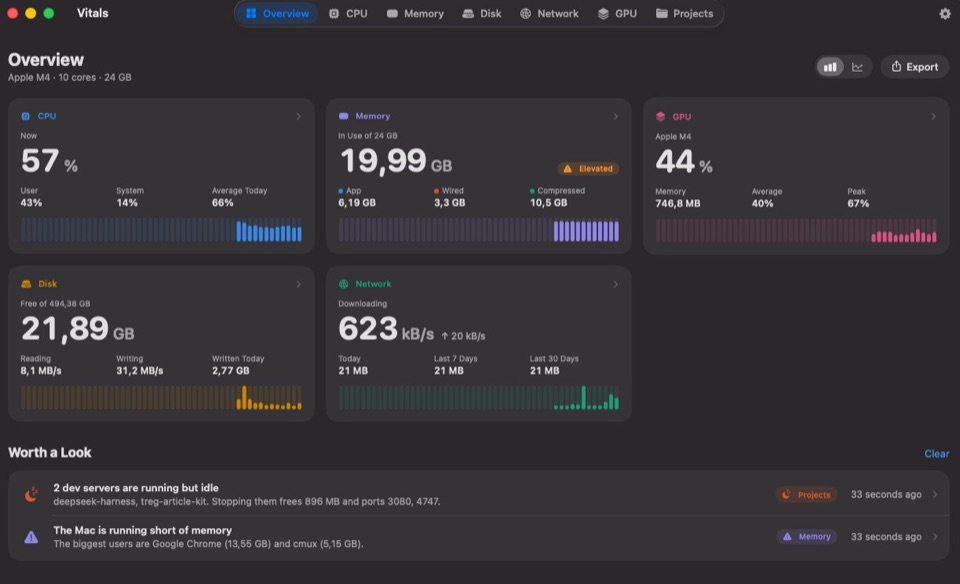
An activity monitor and process inspector with CPU, GPU, memory, temperatures, fans, disk, network and battery, the app behind every figure, up to a year of history, every coding agent you run, and an MCP server for Claude, Codex and Cursor.
Glance up and know what your Mac is doing. CPU, memory, network, temperature, battery and more, each its own item, as a number, a graph or both. A reading turns red while it is under strain, so you look only when it matters.
Click one and the dropdown shows every figure and the apps behind each. Click an app and the window opens on it.
Try it: drag the items along the bar, pick a tab, move a slider on the Sound tab. In the app, hold ⌘ to drag.
04Developers
Built for Macs that run coding agents
Agents start servers, browsers and tool servers, and use up your AI plans. Vitals shows all of it, by project.
Projects8 dev servers · 6 idle
4322
storefront-web
node · up 3 days, barely used
458 MBStop…
8000
scraper-api
python · up 4 days, barely used
412 MBStop…
4321
marketing-site
node · idle 2 hours
296 MBStop…
3000
billing-api
node · idle 45 min
204 MBStop…
5173
docs
node
188 MBworking
8080
admin-panel
java · up 2 days, barely used
612 MBStop…
6006
design-system
node
242 MBworking
8888
notebooks
python · idle 5 hours
336 MBStop…
storefront-web stopped.458 MB and port 4322 are free.
Agents2 sessions · 1.79 GB · 66% CPU
0%
Claude
This week
On pace · 10% to spare
0%
Codex
5-hour session
Resets in 3h 12m
0%
GitHub Copilot
Premium requests
Runs out in 4d at this rate
0%
Cursor
This billing cycle
Resets in 12d 5h
Checkout flow testsWorkingWaiting for you
Claude Code · storefront · running 48 min
410 MB
Started · 4Quit Session…
vitestcommand · 61% CPU520 MB
nodeserver · port 3,001240 MB
Google Chrome for Testingbrowser310 MB
mcp-server-fetchtool server64 MB
Codexidle 48 min
docs · in Terminal · Nothing started
290 MB
CodexConnected to Vitals
ClaudeConnected to Vitals
CursorConnected to Vitals
My Mac feels slow. What is going on?
Asked Vitals
Google Chrome48% CPU for 10 min · 3.3 GB
Xcodebuilding · 6 cores
storefront-webnode · 458 MB · unused for 3 days
Xcode is your build. Shall I ask Vitals to quit the dev server?
Yes
Vitals
Codex asks to quit storefront-web
node · port 4322 · 458 MB
Vitals thinks this is safe to quit.
Don’t QuitQuit
Done. 458 MB and port 4322 are free.
My battery is at 40% and it is not even noon. Why?
Asked Vitals
Zoom11 W on average this morning
Google Chrome4 W on average
Xcode2 W, one build
Zoom used the most, through your call at ten. Chrome is next, with 42 tabs open. Nothing here needs quitting.
Something is on port 3000. What is it?
Asked Vitals
billing-apinode · port 3000 · 204 MB
A dev server in billing-api, started two days ago and idle for three hours. It still answers, so it is yours to keep or quit.
Leave it.
Left running.
Terminal — zsh
~ vitals status
● CPU 27% · Apple M4 Pro, 14 cores
● Memory 52.6 GB of 64 GB · pressure normal
● GPU 18%
● Disk 412 GB free of 1 TB
● Network down 1.2 MB/s · up 84 KB/s
● Battery 82% · 4h 10m left
● Heat CPU 52° · fans 1,800 rpm
~ vitals top memory 4
APP MEMORY CPU PROCS
Google Chrome 21.2 GB 48% 96
VS Code 8.2 GB 14% 31
Terminal 3.9 GB 3% 12
Figma 2.8 GB 6% 8
62 apps running · by memory
~ vitals ports
PORT PROCESS PROJECT OPEN TO
3000 node storefront-web network
4322 node docs-site this Mac
5432 postgres – this Mac
8080 python api this Mac
4 ports listening · 1 open to the network
~ vitals stop --idle
✓ Safe to quit node (48211) of docs-site · port 4322
Idle for 3 days. Stopping it frees 458 MB.
Continue? [y/N] y
Stopped node (48211). Port 4322 is free.
~ vitals agents
AGENT PROJECT STATUS MEMORY
Claude Code storefront-web working 412 MB
Codex api waiting for you 4m 287 MB
Gemini CLI docs-site working 198 MB
3 sessions · 6 processes started
~ vitals limits
TOOL LIMIT LEFT RESETS PACE
Claude 5-hour session 59% in 2h 10m on pace
Claude This week 72% Mon 9:00 on pace
Codex This week 38% Thu 14:00 runs out Wed
Cursor This month 81% Nov 3 on pace
$ brewinstall--caskforedotstudio/tap/vitals
05Compared
Vitals compared with Activity Monitor
Activity Monitor is good at showing what is happening this second. Vitals also tells you which app is responsible, what happened while you were not looking, and when something needs your attention.
Makes up really well for everything the built-in Activity Monitor lacks on MacOS, and then some… Highly recommended and well worth the money for the peace of mind it gives me!
Vitals has reminded me of two vital things: first, that Dia is using up most of my memory (something that was supposedly one of its strengths when we switched from Chrome), and second, that I need to order my next Mac with 32 GB of memory.
If you on Mac running agents then use this app. Been using for just over a week and loving it. It tells me which codex projects are eating all my resources
Disclaimer: I'm part of the AppSumo team. This in no way influences my review or rating of this product.
Vitals is everything I've been looking for (and more) for my Mac. Within 5 minutes of using it, I've already reclaimed 10GB of memory capacity from old processes and containers I didn't even realize were running.
If you've been struggling with speed, memory, or "why is my computer hot?", THIS IS THE APP FOR YOU!! It's simple, fast, and beautifully designed.
Highly recommend.
I’m a visual processor and the tools built in to the Mac and Windows OS’s just make things worse for me. Vitals shows me what I want to know quickly and in a visually organized way that I can understand.
For better or worse it has shown me that I am clearly due for a laptop upgrade from my 2020 MacBook Air M1. 😂 the three programs I use most (VSCode, Chrome, and Claude) plus the OS itself, completely saturate the memory of the machine and now I know why adding one more task would grind my machine to a halt. It also showed me what things are resource intensive so I know what not to try and run at the same time.
Fantastic and super helpful. Great UI and UX!
After years of using iStats, I’ve uninstalled it, even with a lifetime license.
Switched to Vitals on both my Mac Studio and my laptop. Much more responsive, does what I need better and supports a solo founder.
Here's to lots of frequent updates and new features with the power of AI!
macOS Activity Monitor is horrible when I’m juggling dev projects and local AI.
Vitals is so much better: CPU, memory, GPU, and which projects are still running, all in one place.
Exactly what I needed.
The Activity Monitor provides me with 1000 processes but leaves the tallying up to me. Vitals categorizes apps, maintains 30 days worth of history, and discovers long-forgotten development servers. Menu bar apps provide only the load, and not the cause. The one-time fee cemented it.
Picked up Vitals today and it's already earning its keep — I can finally see exactly what's behind my CPU/RAM spikes (and confirm it's not my own apps 😅). Genuinely useful from day one.
I bought it as soon as I saw it, as i’m not pleased with standard macos activity monitor, and it is amazing, super fast, well designed, tons of details. Amazing the projects one for developers as me dealing with leaked node processes 😂
I was one of the first 30 to get it. Your website was enough to impress me. The app is great. Wonderful idea and implementation. I can’t wait for future updates and enhancements
Recently, my MBP M1 has been noticeably slow, and I was curious to hunt for a tool that can give me a clear picture of what's eating up all that available memory. None matched my expectations except Vitals. A breath of fresh air to the UI that conveys all those important vitals that are needed, especially on a bit of a reasonably old machine.
I bought Vitals and have been using it, and I’m really impressed. It delivers on its promise: I can see which apps are using my Mac’s resources without digging through a long list of processes. The interface is clear, beautifully designed, and a pleasure to use.
The download link appears as soon as you pay, and your key arrives by email. Checkout by Paddle. Prices are before tax. VAT, GST or sales tax is added at checkout where it applies. Prices in . You pay in at checkout. Not sure yet? Try it free for 3 days. A Flit Lifetime from before its one-Mac plans comes with Vitals and Levers: claim Vitals, claim Levers.
Activity Monitor lists processes, about a thousand on a working Mac. Vitals lists apps. Every helper is added to the app that launched it, so each app has one figure for memory, CPU, energy, disk and network. Vitals also keeps up to a year of history, sends a notification when an app misbehaves, lives in the menu bar, finds dev servers left running, shows your coding agents and what is left of your AI plans, and answers Claude, Codex and Cursor over MCP.
Does it replace Activity Monitor completely?
For everyday questions, yes: what is using the memory, what is draining the battery or keeping the Mac awake, and what is slowing it down. You can quit or force quit an app or a single process from Vitals. Activity Monitor still has a few specialist tools, such as sampling a process, that Vitals does not copy.
What is the Process Inspector?
Click any process in Vitals, or the info button beside it in an app’s drawer, and the Process Inspector opens on it. It shows the app the process belongs to; its code signature, with the Team ID, hardened runtime and sandbox; its parent process, launch agent and full command line; and its use since it started: CPU time split into user and system, memory against its peak, open files, disk and network, and its child processes. An app adds its version, bundle ID and Info.plist. Copy it, save it as a CSV file, or get the same in Terminal with vitals process.
Does Vitals show my Claude Code and Codex usage limits?
Yes, once you turn on Show Usage Limits of Your AI Plans in Settings → Integrations. The Agents tab shows how much is left of the week, the 5-hour session and a model’s own limit, when each resets and whether you are on pace. It covers Claude, Codex, GitHub Copilot, Cursor, Antigravity, Grok, Ollama and OpenCode, for every account signed in on this Mac. It also counts the tokens Claude Code and Codex used today and this week, and the menu bar can show what is left. It asks each tool’s maker with the sign-in already on this Mac, the way the tool does itself, and sends nothing else.
Which coding agents does Vitals see?
Claude Code, Codex, Gemini CLI, Aider, OpenCode, Cursor, GitHub Copilot, Amp, Kiro and Goose. Each running session shows its project, whether it is working or waiting for you, and everything it started: dev servers, browsers and tool servers. Quit a session and everything it started, together.
Can I use Vitals from the terminal?
Yes, with the vitals command. vitals status, vitals top, vitals ports, vitals agents and vitals limits give the same answers as the window, as a table or as JSON for scripts. Turn it on in Settings → Integrations, or install the app and the command together with Homebrew: brew install --cask foredotstudio/tap/vitals.
If Homebrew says there is already an app at /Applications/Vitals.app, that copy came from somewhere else, such as the download page, and Homebrew won’t replace it. Run brew update, then brew install --cask --force foredotstudio/tap/vitals, and Homebrew takes it over. Your settings and license stay as they are, and Vitals keeps updating itself.
Does it slow my Mac down?
With no window open it samples every five seconds and uses about a tenth of a percent of one core. It samples faster only while you are looking at it.
Which Macs does it run on?
macOS 15 Sequoia or later, on Apple silicon and Intel. Power and temperature figures are most detailed on Apple silicon.
Is Vitals in my language?
Vitals is in English, German, French, Spanish, Italian, Dutch, Swedish, Brazilian Portuguese, Ukrainian, Japanese, Korean, Simplified Chinese and Traditional Chinese, in the words your Mac already uses. It follows your Mac’s language. To use another one for Vitals only, add Vitals under Applications in System Settings → General → Language & Region.
Can I arrange the menu bar like iStat Menus?
Yes. Every readout can be its own menu bar item, a value, a graph or both, and you ⌘-drag them into any order. The dropdown and the window are yours to arrange too: choose the tabs, and show, hide or reorder the sections on each. Settings → Customize holds the chart colors, the font and weight of the numbers, and the spacing.
Does it live in the Dock or the menu bar?
Both, if you like. It is always in the menu bar. Turn on Show in Dock and it stays in the Dock like Activity Monitor; opened by hand it shows its window, and at login it stays in the menu bar.
Buying
How much does it cost?
Two ways to buy, both one payment. Lifetime, with every update for life, is $39 for one Mac at the regular price. The launch price started at $5 for the first 1,000 licenses and rises in steps as they sell, up to the regular $39. The pricing card shows the price today, how many are left at it, and what it goes to next. The count comes from our licensing server, so it is the real number. A year of updates is $9 for one Mac. Vitals with our two other apps, Flit and Levers, is $49 for all three.
Do I pay again for updates?
With Lifetime, no: every update is included for life, with no paid upgrades and nothing to renew. With a year of updates, you get every version released in the next twelve months, and the app keeps working after that for as long as you like. Only a version released after your year needs a renewal, and renewing is your choice.
What happens when the year of updates ends?
Nothing, unless you want a newer version. The license never expires: the version you have keeps working, and the app stops offering versions released after your year. If you install one by hand, it tells you the year has ended and points you back to the last version your license includes. Renew whenever you want to move on.
Do prices include tax?
No. Prices are before tax. Where your country charges VAT, GST or sales tax, Paddle adds it at checkout and passes it on to your tax office.
What are Flit and Levers?
Our two other Mac apps. Flit is dictation that never leaves your Mac: speak, and the words appear wherever you type. Levers hides the desktop, the Dock and menu bar icons before you record your screen, and puts them back in one click. Fore Plus is $49 for Vitals, Flit and Levers on one key. Fore Insider is $99 for those and every app we release later. Each covers one Mac for each app, with every update for life.
What is coming next?
The roadmap at vitalsmac.com/roadmap lists it in order: a storage map of what takes your disk space; safe cleanup of caches and old build files; the health of your drives; disk activity for each connected drive; and Mac Health, one line on how your Mac is doing. It also says what comes later and what was asked for and won’t be built. There are no dates. A lifetime license includes all of it, and a year of updates includes what ships during the year.
How many Macs can I use it on?
As many as you pay for. One license covers one Mac. For more, pick a pack of 2, 5, 10 or 25 Macs on the pricing card. You get one license key that works on that many Macs, and each Mac costs less as the pack gets bigger: $25 for 2, down to about $8 a Mac in the pack of 25. Move a license to a new Mac whenever you like, with no account and no email to support.
Can I get Vitals free by posting or writing about it?
Yes. Try it free, post about it on X, Threads, Reels, TikTok or Shorts, and email us the link. At 5,000 views you get a code for half off, and at 20,000 views a license for one Mac. On X and Threads it takes 10,000 and 50,000 views. An article on a tech site of your own with an Ahrefs Domain Rating of 30 or more and decent traffic from search gets a license too. The rules are at vitalsmac.com/back.
Is there a student or teacher discount?
Yes, half price, for students, teachers and school staff. Email [email protected] from your school email address and we reply with a one-use code for one Mac. The details are at vitalsmac.com/education.
Is there a free trial?
Yes, 3 days with every feature, and no account or card. Download Vitals and choose Try Free when it opens. After you buy, there is still a 14-day refund.
How do I get the app after paying?
The download link is on the page you land on after checkout. Your license key arrives by email within a minute. If you lose either, enter your key on the download page to get the link again.
Why is it not on the Mac App Store?
The App Store sandbox stops an app from reading other apps' processes, which is the one thing an activity monitor has to do. Vitals is signed with our Apple Developer ID and notarized by Apple, so it opens like any other app.
Privacy and safety
Does it send anything about my Mac anywhere?
Nothing about what you run. Your apps, your history and your project names stay on the Mac. Vitals goes online only to check for updates and to check your license. Activating sends the key, the Mac's name and an anonymous ID, so you can tell your Macs apart when you move a license.
What is the optional helper?
macOS only lets an app read your own processes. To include the system's, you can enable a small helper. It answers one question, how much these processes are using, takes no commands, changes nothing, and quits when Vitals closes. Vitals works without it.
Can Vitals quit apps on its own?
No. It only quits an app, a process or a dev server when you ask, and it shows a confirmation first.
Lifetime for $15 while the launch price lasts
50 left at this price. Then $39, or $9 for a year of updates. One payment, 14-day refund.
 Activity Monitor