Chrome一直在大量占用CPU
10分钟内平均占用70%。

Slack占用的内存越来越多
1小时内增加了1.4 GB,目前为3.3 GB。

App异常提醒
当某个App大量占用CPU、内存不断增长,或频繁读写磁盘或网络时,发送通知提醒你。
 活动监视器
活动监视器Vitals把每个进程归到它所属的App下,让你看到的是60个App,而不是1,000个进程。它会保留30天的历史记录,在App出现异常时提醒你,并常驻菜单栏。
$5价位已售出1,000份
Windows用户?加入候补名单
深受690+位Mac用户喜爱 看看他们怎么说 Google Chrome 21.23 GB  VS Code 8.17 GB
  Terminal 3.86 GB
  Safari 2.69 GB
  GitHub Desktop 427 mW Google Chrome 367 mW
  Zoom 145 mW Terminal 86 mW Google Chrome
 Google Chrome
  Photos

 Safari
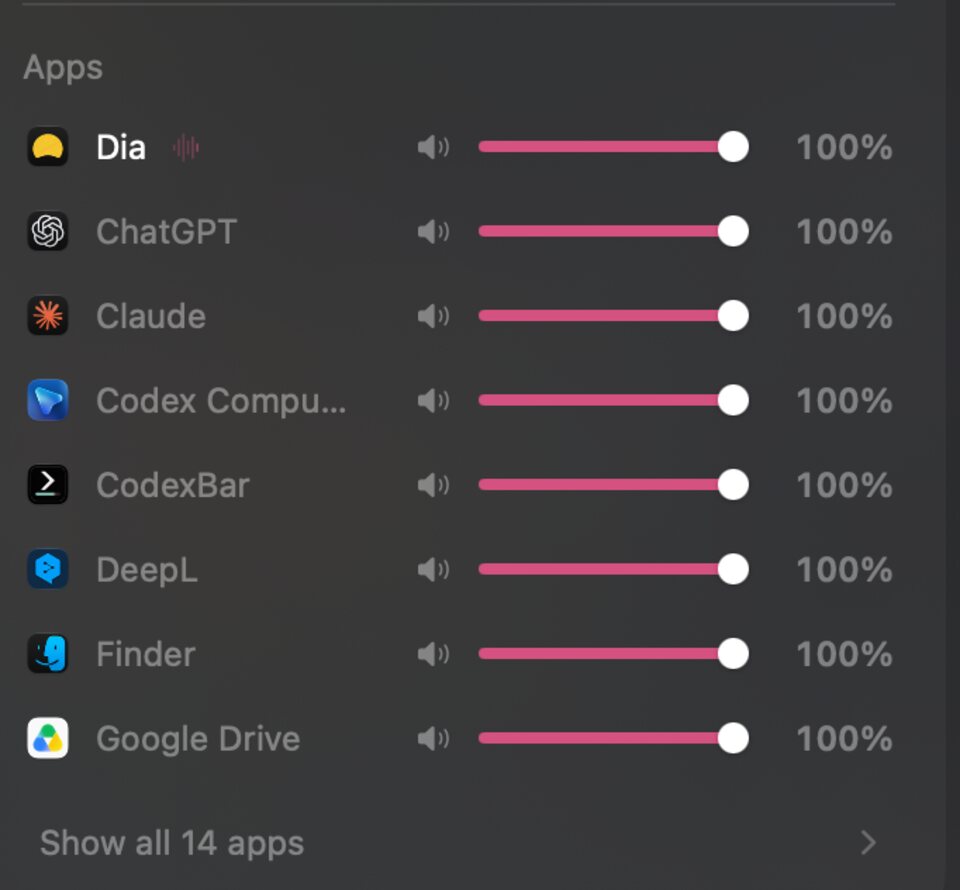
  Figma Google Chrome 音乐 正在播放 100% Zoom 正在播放 80% Google Chrome 正在播放 35% Slack 无声 已静音 Safari 无声 100% Figma 无声 100% Notion 无声 100% 邮件 无声 100%
 试试看:每个标签页都能用。数据是模拟的,因为网页无法读取你的Mac,也不应该读取。
Now I find myself stealing quick glances at the menu bar, instead of taking another sip of coffee.
 Ed Wiseman 艾美奖获奖导演兼制片人
 macOS Activity Monitor is horrible when I’m juggling dev projects and local AI. Vitals is so much better.
 Knowix 开发者、AI构建者
 cant keep vibecoding everything for $5, i get a finished product, clean ui, and bug fixes
 Sai Krishna Superblog创始人
 活动监视器列出每一个进程。在一台正在工作的Mac上,这大约有一千行,其中一百行都叫Google Chrome Helper。
Vitals把每个帮助程序计入启动它的App。每个App只有一行、一个数值,因此“是什么在占用我的内存?”一行就能回答。
活动监视器擅长显示此刻正在发生的事。Vitals还会告诉你是哪个App造成的、你没看时发生了什么,以及什么时候需要你留意。
完整的逐行对比见Vitals与活动监视器对比。不只想和活动监视器比?请看Vitals与iStat Menus对比、Vitals与Stats对比,或所有活动监视器替代品。从Windows转过来?阅读Mac上的任务管理器,或浏览所有指南。
活动监视器 Vitals Vitals按进程运行所在的项目文件夹为其分组,并显示它们开放的端口。
它会指出三天都没干活的开发服务器,并提议帮你停掉。停止任何东西之前,它都会先问你。
每个读数都可以作为单独的菜单栏项:CPU、内存、GPU、网络、磁盘、温度或电池,显示数值、曲线图或两者,带不带图标均可。按住⌘拖移,即可随意排序。当你的Mac负载过重时,图标会变成警告标志。
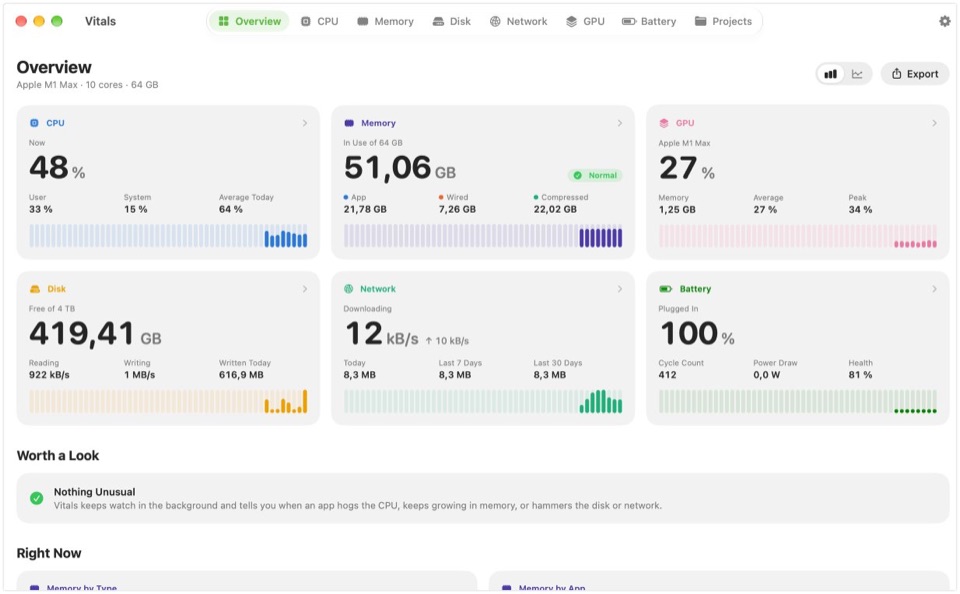
点按任一项即可打开下拉面板:所有指标一屏看完,还有当前最忙的App,每项指标各有一个标签页,列出数值背后的App。可以排列其中的卡片,也可以切换为每项指标一行的列表。点按某个App,窗口就会打开并显示它。
横向比较:最佳Mac菜单栏系统监控工具和最佳Mac系统监控工具。
Google Chrome – 终端 – Safari – Google Chrome – 终端 – Safari – Docker – Visual Studio Code – Google Chrome – Visual Studio Code – 终端 – Safari – Docker – 照片 – Google Chrome – Docker – Visual Studio Code – Xcode – Safari – Google Chrome – Slack – Zoom – 音乐 – Figma – Google Chrome – Safari – Zoom – Visual Studio Code – Google Chrome – Zoom – Figma – Slack – Safari – 音乐 100% Zoom 80% Google Chrome 35% Slack 已静音 试试看:沿菜单栏拖移各项,选择一个标签页,或在“声效”标签页中拖动滑块。在App中,按住⌘即可拖移。
你购买的是许可证密钥。没有需要登录的东西。
Vitals不会报告你运行了什么、何时运行、运行了多久。
一种检查更新,一种验证许可证。仅此而已。
Vitals附带的八个小功能。
当某个App大量占用CPU、内存不断增长,或频繁读写磁盘或网络时,发送通知提醒你。
Zoom Music Google Chrome 把会议声音调大,音乐调小。不会录制任何内容。
CPU和GPU温度、可自行设定的风扇转速,以及AirPods、鼠标和键盘的电量。
过去12小时、24小时、7天或30天的数据,以及哪些App用得最多。保存在你Mac上的一个小文件里。
可从任意列表中退出App或单个进程。Vitals总会先问你。
Vitals
MacBook Pro · M2 Max 将内存、排名靠前的App和CPU保存为1200 × 630的分享卡片,或拷贝整个仪表盘。为发帖而设计,有浅色和深色两种。
选择要显示的标签页,再显示、隐藏或重新排序每个标签页中的板块。下拉面板的卡片和菜单栏项也一样。“还原”可恢复原样。
摄氏度或华氏度、字节或位、按内核或按整台Mac计算CPU。“设置”会用你自己Mac的数据展示每一种。
用户好评
他们在X、Hacker News和Product Hunt上的原话。
Vitals has reminded me of two vital things: first, that Dia is using up most of my memory (something that was supposedly one of its strengths when we switched from Chrome), and second, that I need to order my next Mac with 32 GB of memory.
 Asdrúbal Chirinos @achirinos
 After years of using iStats, I’ve uninstalled it, even with a lifetime license. Switched to Vitals on both my Mac Studio and my laptop. Much more responsive, does what I need better and supports a solo founder. Here's to lots of frequent updates and new features with the power of AI!
 DustyFski @DustyFski
 For $5 it’s a steal
 MaximeB @Buildingitmyway
 Thank you so much! The volume control update is exactly what I needed. Best $5 I’ve spent 🙌
 eugen @lucian_forseti
 Super cool idea man!!!
 Dominik Sobe @sobedominik
 I’m a longtime menumeters user. but Vitals will likely unseat it
 James @jamesdrakefilms
 Best $5 I ever spent. Good job Atta
 Steve Chazin 来自Hacker News
 It's definitely "no brainer" pricing territory rn
 R. @RichDoesTech
 cool idea :)
 Daniel Smidstrup @DanielSmidstrup
 Just give a shot to this guy 🫡
 Lucien Arbieu @ArbieuLucien
 instant purchase
 Nicholas Arce @nickarceco
 Great product really enjoying it. And $5 is an absurdly good deal lol. Thanks for building this! 🙌
 Ivan Golovach @ivandotge
 just bought
 Bud Hennekes @Aboundlessworld
 nice website, looks clean as well! definitely pulling ’em in.
 Jordy @Droppyformac
 Wait what $5?? That’s it?
 Hakimuddin K @hakimuddinkika
 Granted I am a data geek, but I have to say I love Vitals. Such a slick app, much better than Activity Monitor. I hope Apple buys you out!
 Nicolas @habibicode
 website is nicely made by the way, apple-like!
 oleks @oleks01
 love this. instant buy
 Shashank Bhardwaj @bhardwajshash
 $5 for a lifetime license is a steal for an app-focused Activity Monitor
 Kimi Nguyen @kimindiehacker
 per app volume control on mac is worth the $5 alone
 Sadok @yesadok
 Vitals is such an upgrade over Activity Monitor, having CPU, memory, GPU and projects in one place is a game changer
 Sarmad Tahir @itxsarmadd
 The Activity Monitor provides me with 1000 processes but leaves the tallying up to me. Vitals categorizes apps, maintains 30 days worth of history, and discovers long-forgotten development servers. Menu bar apps provide only the load, and not the cause. The one-time fee cemented it.
 Salman Anwar Awan @salman_anwar_awan
 Picked up Vitals today and it's already earning its keep — I can finally see exactly what's behind my CPU/RAM spikes (and confirm it's not my own apps 😅). Genuinely useful from day one.
 Daniel Hipskind @greigh
 I’ve been looking for an app like this forever, and this is exactly what I needed. Love the UI too — it’s surprisingly hard to find something decent out there. Took me about 20 seconds to be convinced and make the purchase. Really well done. $5 gladly spent!
 Filippo Rovelli @filippo_rovelli
 I bought it as soon as I saw it, as i’m not pleased with standard macos activity monitor, and it is amazing, super fast, well designed, tons of details. Amazing the projects one for developers as me dealing with leaked node processes 😂
 Gabriel @gabzarias
 I was one of the first 30 to get it. Your website was enough to impress me. The app is great. Wonderful idea and implementation. I can’t wait for future updates and enhancements
 Kishore Surendiran @kishore2908
 Recently, my MBP M1 has been noticeably slow, and I was curious to hunt for a tool that can give me a clear picture of what's eating up all that available memory. None matched my expectations except Vitals. A breath of fresh air to the UI that conveys all those important vitals that are needed, especially on a bit of a reasonably old machine.
 Askar @askar
 I bought Vitals and have been using it, and I’m really impressed. It delivers on its promise: I can see which apps are using my Mac’s resources without digging through a long list of processes. The interface is clear, beautifully designed, and a pleasure to use.
 Fillipe Neyl Walecki @neylwalecki
 首发期间$9,随着许可证售出逐级涨至$29。无需订阅,终身享有所有更新。
一次性付款,1台Mac
接下来的100份许可证售价$9,之后$29
发布当天开放购买。
“The Activity Monitor provides me with 1000 processes but leaves the tallying up to me… The one-time fee cemented it.”
Salman Anwar Awan 来自Product Hunt macOS 15 Sequoia或更高版本 · Apple silicon和Intel · 12 MB · 已通过Apple公证
发帖介绍Vitals,返现50%。 帖子火了就全额返还。

购买Flit终身版,免费获得Vitals。 已经拥有Flit?领取你的Vitals。
学生或教师?半价。 用学校邮箱申请。
付款后立即显示下载链接,密钥会通过电子邮件发给你。付款由Paddle处理。
已经购买?获取下载链接。
活动监视器列出的是进程,一台正在工作的Mac上大约有一千个。Vitals列出的是App。每个帮助程序都会计入启动它的App,因此每个App的内存、CPU、能耗、磁盘和网络都只有一个数值。Vitals还会保留30天的历史记录,在App出现异常时发送通知,常驻菜单栏,还能找出一直开着的开发服务器。
日常问题都可以:什么在占用内存,什么在耗电或让Mac保持唤醒,什么在拖慢速度。你可以在Vitals中退出或强制退出App或单个进程。活动监视器仍有少数专业工具(例如对进程取样),Vitals没有照搬。
没有打开窗口时,它每五秒取样一次,约占一个内核的千分之一。只有在你查看它时,它才会加快取样。
macOS 15 Sequoia或更高版本,支持Apple silicon和Intel。在Apple silicon上,功率和温度数据最为详细。
支持。Vitals有英语、德语、法语、西班牙语、意大利语、荷兰语、瑞典语、巴西葡萄牙语、日语、韩语和简体中文版本,用的都是你的Mac本来就在用的词。它跟随Mac的语言。若要仅为Vitals使用其他语言,请在“系统设置”→“通用”→“语言与地区”的“应用程序”下方添加Vitals。
可以。每个读数都可以作为单独的菜单栏项,显示数值、曲线图或两者,按住⌘拖移即可随意排序。下拉面板和窗口也由你排列:选择标签页,并显示、隐藏或重新排序每个标签页中的板块。
只要你愿意,两处都可以。它始终在菜单栏中。打开“在程序坞中显示”,它就会像活动监视器一样留在程序坞中;手动打开时显示窗口,登录时则只留在菜单栏中。
1台Mac的常规价格为$29。首发价从前1,000份许可证的$5起步,随着售出逐级上涨,直至常规价$29。价格卡片会显示当前价格、该价位还剩多少份,以及下一档价格。这是一次性付款,不是订阅。数量来自我们的许可证服务器,是真实数字。
不需要。所有更新终身包含。没有付费升级,也不用续费。
vitalsmac.com/roadmap上的路线图按顺序列出了这些内容:一个MCP服务器,让你的AI助手在动你的Mac之前先问问Vitals;一个面向Claude Code、Codex等工具的“智能体”标签页;一张显示磁盘空间被什么占用的存储地图;以及安全清理缓存和旧的构建文件。路线图还列出了之后会做的内容,以及有人提过但不会做的内容。没有日期,而且所有这些都包含在一次付款中。
付费几台,就能用几台。一份许可证对应1台Mac,2台Mac就是两倍价格。需要更多时,可在价格卡片上选择5、10、25或50台Mac。你会得到一个可在这么多台Mac上使用的许可证密钥,套装越大,每台Mac越便宜:5台$99,最多50台$699。首发期间,如果按首发价逐台计算更便宜,套装就按首发价逐台计价。你可以随时把许可证转移到新的Mac上,不需要账户,也不用发邮件给客服。
购买Vitals,在X、Threads、Reels、TikTok或Shorts上发帖介绍它,然后把链接发邮件给我们。观看次数达到5,000,我们退还你所付金额的一半;达到20,000,全额退还。在X和Threads上,分别需要10,000和50,000次观看。许可证仍归你所有。具体规则见返现页面。
有,半价,面向学生、教师和学校教职工。用你的学校邮箱发送电子邮件至[email protected],我们会回复一个可用于1台Mac的一次性优惠码。详情见vitalsmac.com/education。
没有,但可以在14天内退款。如果Vitals不适合你,发邮件给我们,我们会退还款项。
下载链接就在付款完成后跳转的页面上。许可证密钥会在一分钟内通过电子邮件送达。如果哪一个没收到,在下载页面输入密钥即可再次获取链接。
App Store的沙盒不允许App读取其他App的进程,而这恰恰是活动监视工具必须做的事。Vitals使用我们的Apple Developer ID签名,并已通过Apple公证,因此能像其他App一样打开。
你运行的任何内容都不会发送。你的App、历史记录和项目名称都留在Mac上。Vitals只在检查更新和验证许可证时联网。激活时会发送密钥、Mac的名称和一个匿名ID,方便你在转移许可证时区分自己的各台Mac。
macOS只允许App读取你自己的进程。若要包含系统进程,你可以启用一个小型帮助程序。它只回答一个问题:这些进程用了多少资源。它不接受命令,不更改任何内容,并会在Vitals关闭时退出。没有它,Vitals也能正常工作。
不会。只有在你要求时,它才会退出App、进程或开发服务器,并且会先请你确认。